
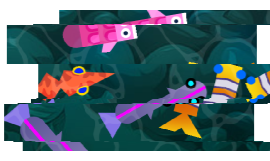
| Name | Type | Attributes | Default | Description |
|---|---|---|---|---|
options |
object |
<optional> |
The more optional parameters of the filter. |
|
options.slices |
number |
<optional> |
5 |
The maximum number of slices. |
options.offset |
number |
<optional> |
100 |
The maximum offset amount of slices. |
options.direction |
number |
<optional> |
0 |
The angle in degree of the offset of slices. |
options.fillMode |
number |
<optional> |
0 |
The fill mode of the space after the offset. Acceptable values:
|
options.seed |
number |
<optional> |
0 |
A seed value for randomizing glitch effect. |
options.average |
boolean |
<optional> |
false |
|
options.minSize |
number |
<optional> |
8 |
Minimum size of individual slice. Segment of total |
options.sampleSize |
number |
<optional> |
512 |
The resolution of the displacement map texture. |
options.red |
Array<number> |
<optional> |
[0,0] |
Red channel offset |
options.green |
Array<number> |
<optional> |
[0,0] |
Green channel offset. |
options.blue |
Array<number> |
<optional> |
[0,0] |
Blue channel offset. |
Extends
- PIXI.Filter
Members
Fill mode as clamp
- Default Value:
- 3
Default constructor options.
Fill mode as loop
- Default Value:
- 2
Fill mode as mirror
- Default Value:
- 4
Fill mode as original
- Default Value:
- 1
Fill mode as transparent
- Default Value:
- 0
true will divide the bands roughly based on equal amounts
where as setting to false will vary the band sizes dramatically (more random looking).
- Default Value:
- false
Blue offset.
The angle in degree of the offset of slices.
- Default Value:
- 0
The fill mode of the space after the offset.
Green channel offset.
Minimum size of slices as a portion of the sampleSize
- Default Value:
- 8
The maximum offset value for each of the slices.
- Default Value:
- 100
Manually set custom slices offset of displacement bitmap, this is
a collection of values from -1 to 1. To change the max offset value
set offset.
Red channel offset.
Height of the displacement map canvas.
- Default Value:
- 512
A seed value for randomizing color offset. Animating
this value to Math.random() produces a twitching effect.
- Default Value:
- 0
Manually custom slices size (height) of displacement bitmap
The count of slices.
- Default Value:
- 5
The displacement map is used to generate the bands.
If using your own texture, slices will be ignored.
Methods
Removes all references
Redraw displacement bitmap texture, advanced usage.
Regenerating random size, offsets for slices.
Shuffle the sizes of the slices, advanced usage.